1. Executive Summary
TOTBOOK is a hybrid engineering notebook desktop application. It integrates the structured, flowable layout of a rich text editor (powered by Quill.js) with the spatial, freeform flexibility of a vector drawing board (powered by Fabric.js), enabling users to instantly import, play audio, and view videos directly inside the document in the blink of a second.
The application is built as a desktop app using Tauri (Rust backend + HTML/JS/CSS frontend) and packaged in a modular format. It addresses the fundamental conflict of modern document editors: how to keep freehand sketches, annotations, and media files locked to specific paragraphs (logical flow) while allowing the text itself to wrap, grow, and move dynamically (reflow layout).
2. System Architecture Overview
TOTBOOK uses a hybrid architecture combining a local web frontend with a high-performance Rust backend:
graph TD
    A[Frontend: HTML/CSS/JS] <-->|Tauri IPC Invoke/Listen| B[Backend: Rust Tauri Core]
    A --> C[Quill Editor Layer 1]
    A --> D[Fabric.js Canvas Layer 2]
    A --> E[Floating Media Blocks Layer 3]
    A --> F[AnchorManager Sync Loop]
    B --> G[Zip Archive Bundle File IO]
    B --> H[Google OAuth PKCE Redirect Server]
    B --> I[PowerShell System Clipboard Bridge]
    B --> J[Single Instance Process Manager]
Figure 1: High-level System Architecture & Module Interaction Map
Technical Stack:
- Frontend Engine: Vanilla JavaScript (ES Modules), HTML5, and CSS variables.
- Rich Text Editor: Quill.js v2.0.3 (extensively customized with custom inline blots).
- Vector Drawing Overlay: Fabric.js v5.3.0 (vector strokes, grouping, eraser, shapes).
- Scientific Tools: KaTeX v0.16.27 (local math typesetting), Marked.js (Markdown parsing).
- Floating Card Renderers:
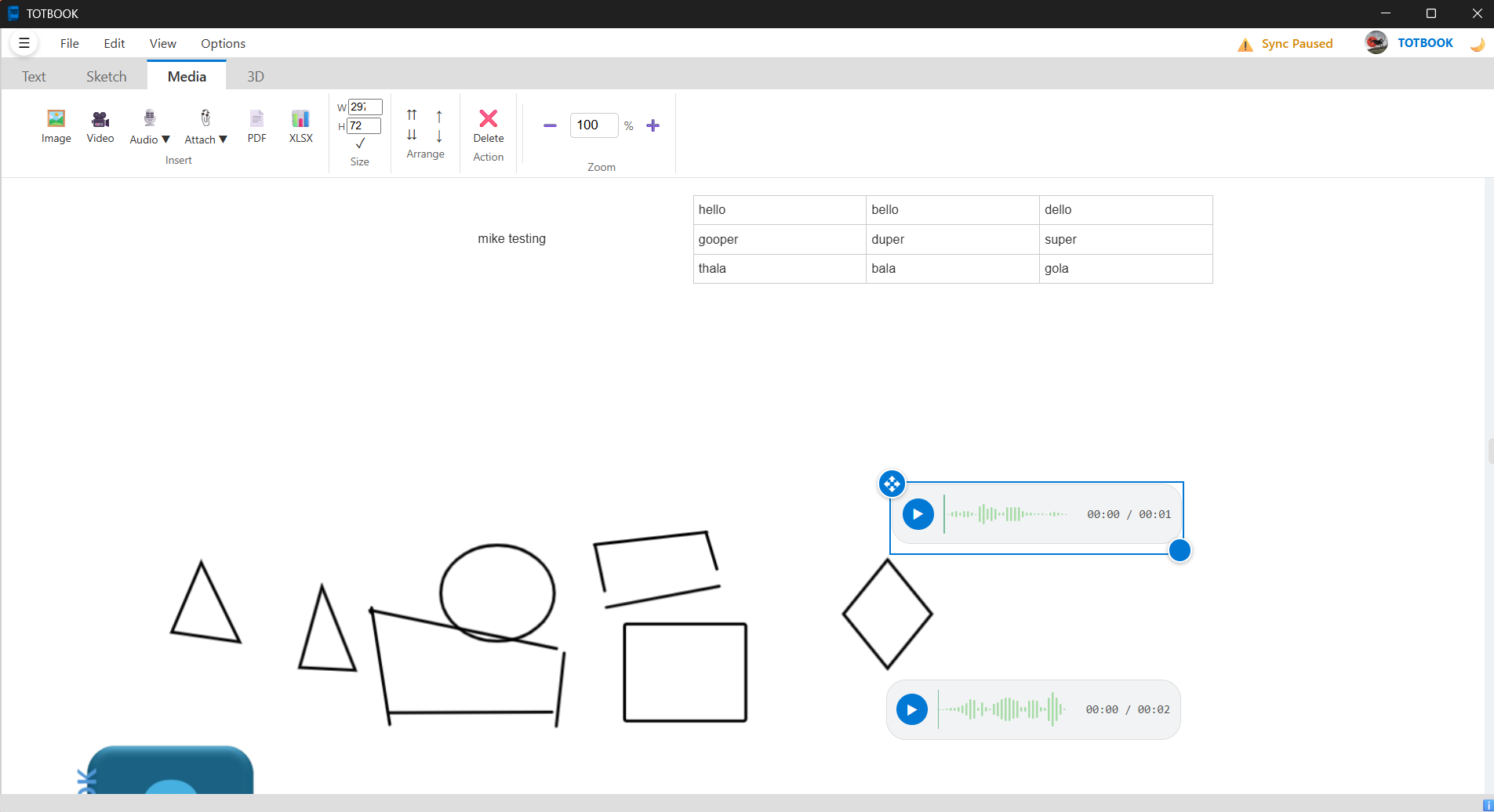
- PDF.js: Sequentially renders multi-page PDF documents onto canvas pages.
- SheetJS (XLSX): Parses binary Excel sheets and compiles interactive tabbed HTML tables.
- Wavesurfer.js: Extracts audio binary data and displays interactive sound waveforms.
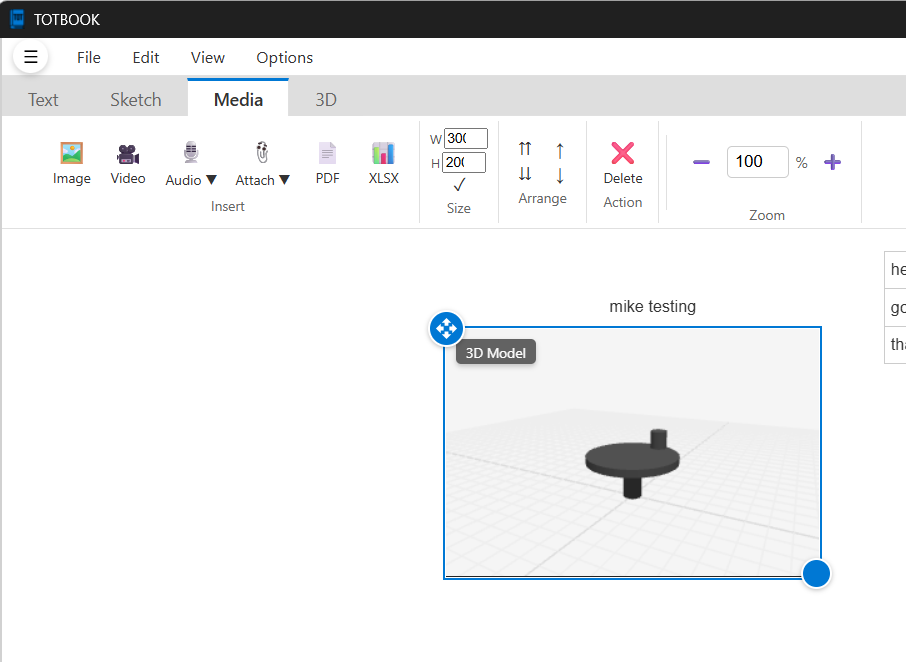
- Three.js: WebGL rendering engine with OrbitControls (for interactive STL, OBJ, GLTF, GLB, FBX, and PLY 3D model viewing).
- Desktop Shell Backend: Tauri v2 (written in Rust), utilizing plugins for File System, Dialogs, Process Control, OAuth, and Single Instance enforcement.
3. The Multi-Layered Workspace
The interface manages overlapping layers of interaction within a unified zooming/panning viewport:
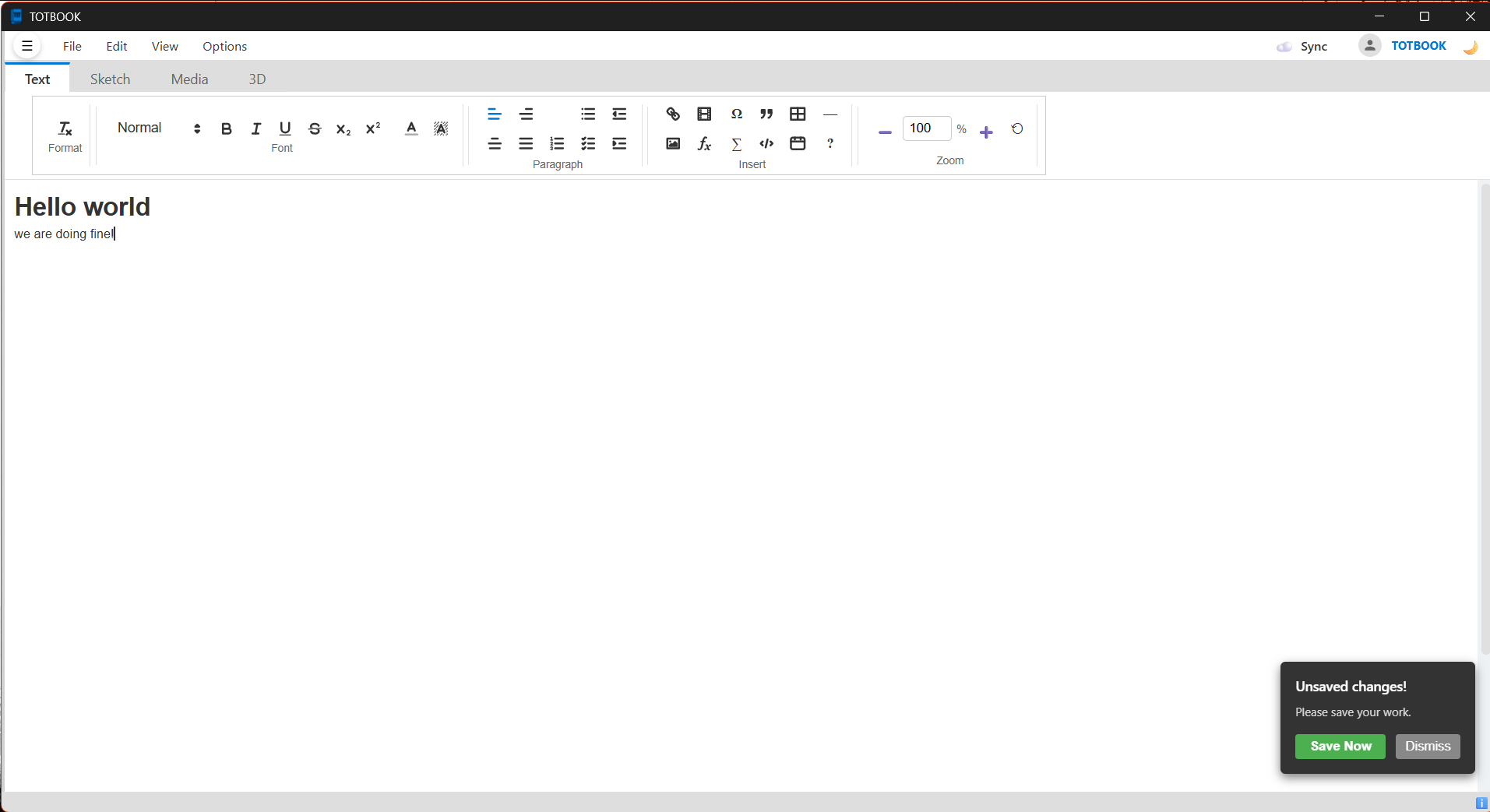 Figure 2: Main workspace window showing multi-layered reflow document
structure
Figure 2: Main workspace window showing multi-layered reflow document
structure
[Viewport Container: #zoom-outer] (Handles scrolls & mouse coordinates)
    └── [Scalable Container: #zoom-inner] (Applies CSS Zoom or Transforms)
         └── [Document Layer: #document-layer] (Common coordinate system)
              ├── Layer 1: [Quill Text Editor: #editor] (Underneath)
              ├── Layer 2: [Canvas Overlay: #drawing-canvas] (Top transparent vector board)
              └── Layer 3: [Floating Blocks] (Draggable text boxes & media cards)
Zooming & Panning Modes
To provide a smooth visual experience across different tasks, TOTBOOK implements two distinct zooming paradigms:
-
Text Mode (Reflow Zoom): Zooming uses the CSS
zoomproperty on#zoom-inner. This scales the typography and editor interface natively. Text wraps properly at the margins, and browser-native scrolling is maintained, preventing layout truncation. -
Sketch Mode (Vector Zoom): Zooming uses CSS 2D transforms (
translateandscale) on#zoom-innerwith a0 0transform-origin. Panning is supported using middle-mouse drag, stylus/pen inputs, or a designated "Pan Tool" (Hand).- Pointer Zoom: Zooms relative to the mouse cursor position.
- Center Zoom: Zooms relative to the viewport center.
4. Anchor & Reflow System (AnchorManager)
The core engineering challenge in hybrid document editors is that rich text flow is vertical and dynamic (reflow), whereas freehand drawings and media blocks are absolute, pixel-positioned entities. If a user inserts paragraphs in the text, absolute drawings become misaligned with their corresponding text.
TOTBOOK solves this using AnchorManager.js:
sequenceDiagram
    participant Q as Quill Editor
    participant AM as AnchorManager
    participant FM as Floating Media Card
    participant FC as Fabric Canvas Shape

    Note over AM: Element is bound
    AM->>Q: Raycast to nearest line
    Q-->>AM: Return line character index
    Note over AM: Store index & delta Y offset

    Q->>AM: Event: 'text-change' (Delta: retain, insert, delete)
    AM->>AM: Adjust character indices of all anchors

    loop requestAnimationFrame (60 FPS reflow)
        AM->>Q: Get bounding box of character index
        Q-->>AM: Return screen coordinates
        AM->>FM: Update style.top = lineTop + offsetY
        AM->>FC: Set Shape top = lineTop + offsetY
        Note over FC: Render Fabric Canvas
    end
Figure 3: Sequential flow of coordinates tracking, anchor shifts, and frame
reflow updates
Core Features:
- Binding: When a shape is drawn or a media card is spawned,
AnchorManageridentifies the nearest text line in Quill, fetches its character index (this.quill.getIndex(line)), and stores the vertical distance (offsetY) between the element and the line top. - Reflowing: A continuous
requestAnimationFramerender loop calculates the current vertical offset of each character index (usingquill.getBounds(index)) and updates the coordinates of the associated HTML nodes (style.top) and Fabric canvas objects (top). - Stabilization Mode: During document load, layout transitions, or undo/redo actions, the
document heights and font layouts might shift rapidly. To prevent visual elements from jumping,
startStabilizationlocks elements to their current screen coordinates and updates their logicaloffsetYvalues in real-time until the layout settles. - Drag/Resize Pause: When a user drags or resizes a drawing or media card, its anchoring is temporarily paused to avoid interference from the reflow loop. Once the action is complete, it is re-bound to the nearest text line at its new position.
5. In-Text Interactive Features (Quill Custom Blots)
The primary text flow managed by Quill is enhanced with interactive inline modules that are serialized directly within the document delta structure.
Telegram-Style Quizzes (QuizBlot):
The application includes a custom QuizBlot (inheriting from Quill's BlockEmbed)
registered as quiz.
- Structure & Hydration: It embeds a question, multiple option texts, correct indicators,
and an optional explanation block as a stringified JSON schema (
data-quiz) on a custom block container. When a document loads, a manual re-hydration script importsformats/quizand re-runsQuizBlot.buildStructure()to wire up interactive listeners. - State & Validation: Clicking a quiz option locks the quiz container
(
answered = true). If correct, the option receives a.correctCSS class (green highlight); if incorrect, it receives.wrong(red highlight) and the correct answer is revealed. - Explanation & Retrying: Correct or incorrect attempts slide open the
.quiz-explanationbox showing a lightbulb tooltip (💡). A hoverable "Retry" button resets class styles and restarts the quiz session.
File Attachments (AttachmentBlot):
Registered as attachment, this block embed represents a local document link or copy card.
- Visual Layout: Renders an attachment card featuring a vector document icon, filename title, and a subtitle ("Shortcut" or "Attachment").
- Click Interception: A capturing click listener intercepts selection focus on the card and
delegates the command to open the file to the Tauri wrapper backend (
open_media_file).
Custom Formatting & Scientific Blots:
- KaTeX Math Blocks: Formulas are compiled offline using KaTeX. The application includes a custom modal editor where typing LaTeX (e.g. \(x^2 + \frac{a}{b}\)) outputs a real-time preview and embeds it as a math blot.
- Divider Blot: Inserts custom-styled
<hr class="totbook-divider">blocks. - Image Floating: Inline images inside the text can be double-clicked to lift them out of the linear text flow. This deletes the inline node and transforms it into an absolutely positioned floating media block.
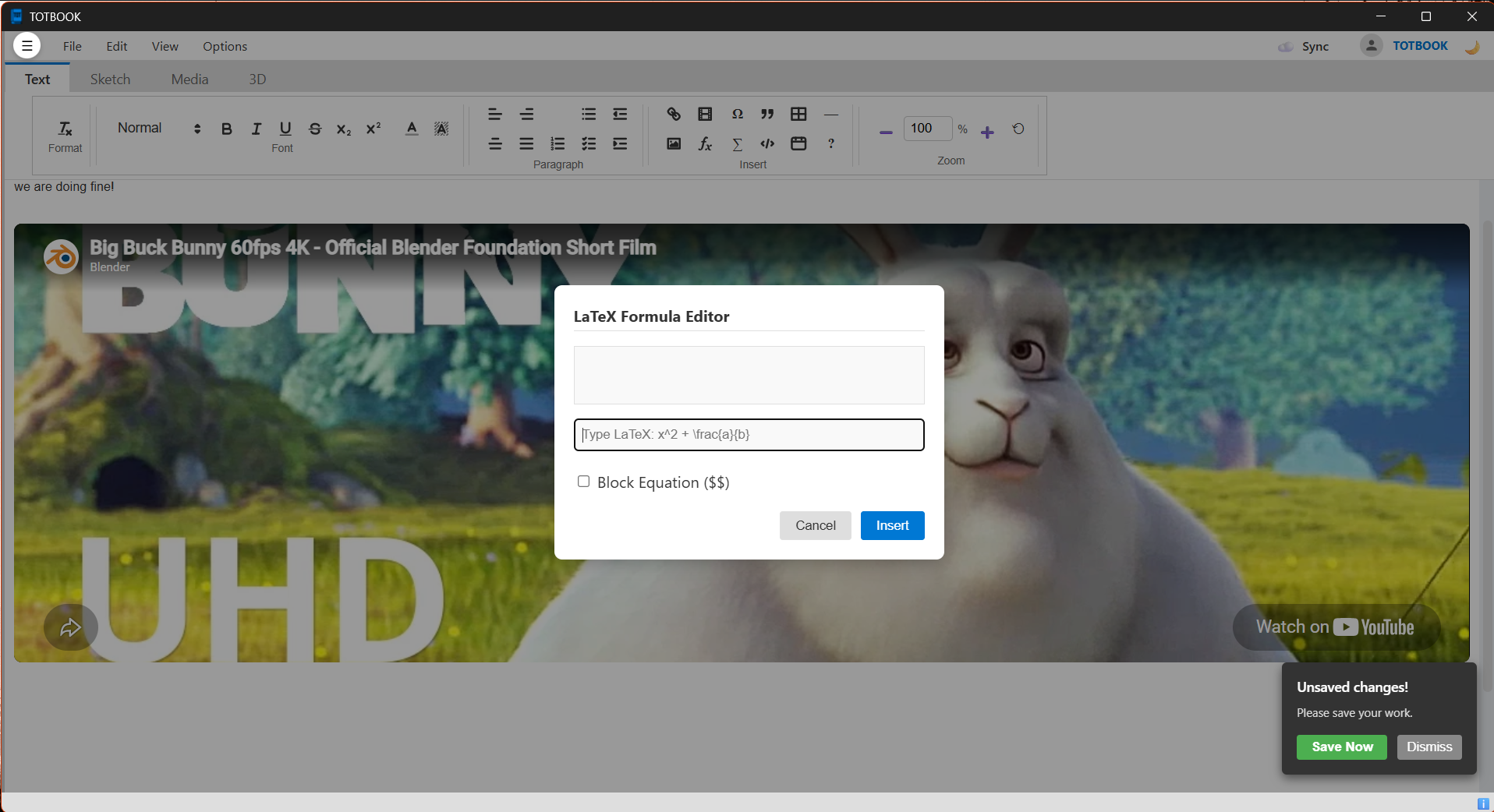 Figure 4: LaTeX Formula Editor
6. Video & Audio Importing and Recording
TOTBOOK provides robust features for importing and recording multimedia assets, placing them as movable cards or inline media.
Audio Manager & Voice Recording:
Users can select "Import Audio" or "Record Audio" from the Media ribbon:
- Direct File Importing: Accepts standard formats (
.mp3,.wav,.m4a,.aac,.ogg,.flac) and spawns a floating media block at the center of the active viewport. - Microphone Capturing: Choosing "Record Audio" launches an overlay modal that accesses the
system microphone via
navigator.mediaDevices.getUserMedia.- Live Visualizer: Captures audio data using Web Audio API's
AudioContextandAnalyserNode(settingfftSize = 256), drawing an animated frequency bar graph on a modal canvas at 60 FPS. - Exporting: The audio stream is captured using a
MediaRecorderinstance. Clicking "Stop & Save" stops the stream, compiles the audio chunks into aaudio/webmBlob, saves it locally as a timestamped file (e.g.,recording_1718000000.webm), and instantiates a floating audio block. - Interactive Waveforms: Audio blocks are rendered using Wavesurfer.js. Upon initialization, Wavesurfer parses the audio file and displays an interactive, seekable audio waveform. Play/pause states are synced to a circular button on the card, and elapsed time displays dynamically.
- Live Visualizer: Captures audio data using Web Audio API's
Video Embed Manager:
Clicking the Video button opens a custom embed modal supporting watch links and direct files:
- YouTube Watch Links: Automatically parses watch URLs (using regex
/([a-zA-Z0-9_-]{11})/) and translates them into responsiveyoutube.com/embediframe URLs. - Google Drive Video Links: Converts standard file share links (e.g.,
/file/d/[id]) into direct iframe preview URLs (drive.google.com/file/d/[id]/preview). - Direct Video Files: Links pointing directly to
.mp4,.webm, or.oggfiles are parsed as HTML5 videos. These are inserted inline into Quill using a customVideoBlot(html5videotag blot) with native browser player controls.
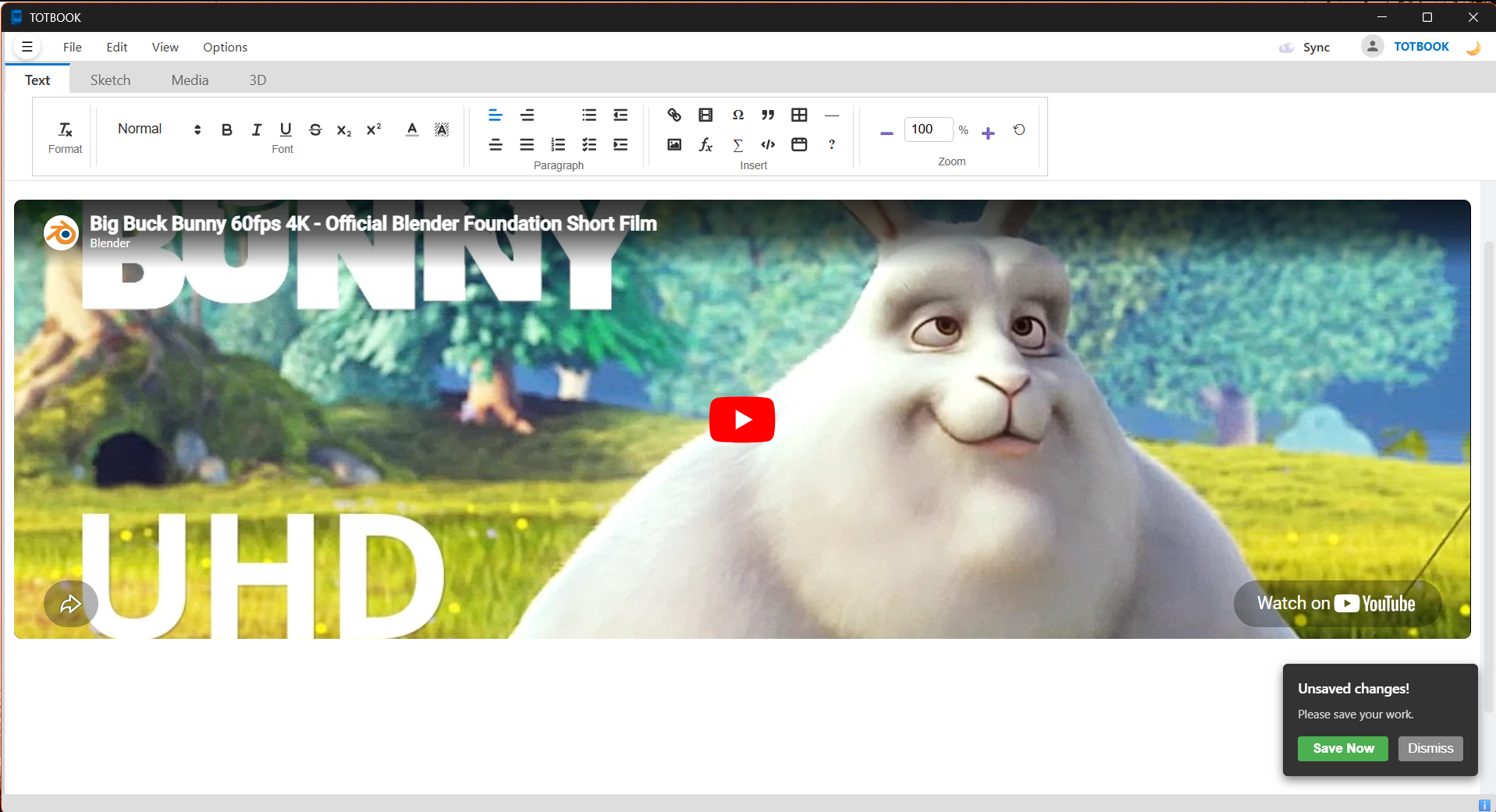 Figure 6: YouTube Video Embed
7. File Attachment & File Import System
The application handles external attachments using two main methods via the Tauri API:
[User Selects File Attachment]
   ├── Option 1: "Link File" (Create Shortcut)
   │     └── Creates an absolute pointer pointing directly to the file on disk.
   │
   └── Option 2: "Attach File" (Import Copy)
         ├── Invokes Rust backend: import_file_to_session(srcPath)
         ├── Copies the file into <temp_session_dir>/media/
         ├── Resolves filename conflicts by appending a Unix timestamp if the file exists.
         └── Returns a portable, relative link: `media/file_timestamp.ext`
File Execution:
Clicking an attachment card or launching a file via double-click triggers Tauri IPC Command
open_media_file:
- If the path is relative (e.g., starting with
media/), it is resolved using the temporary project session directory path (sessionMediaDir). - The Rust backend runs
open::that(path), which uses system APIs to launch the target document in the user's default OS application (e.g., Adobe Acrobat for PDFs, Excel for spreadsheets, or system players for media).
8. Fabric.js Canvas & Drawing Engine
The vector drawing layer covers the entire document height and coordinates directly with the layout engine:
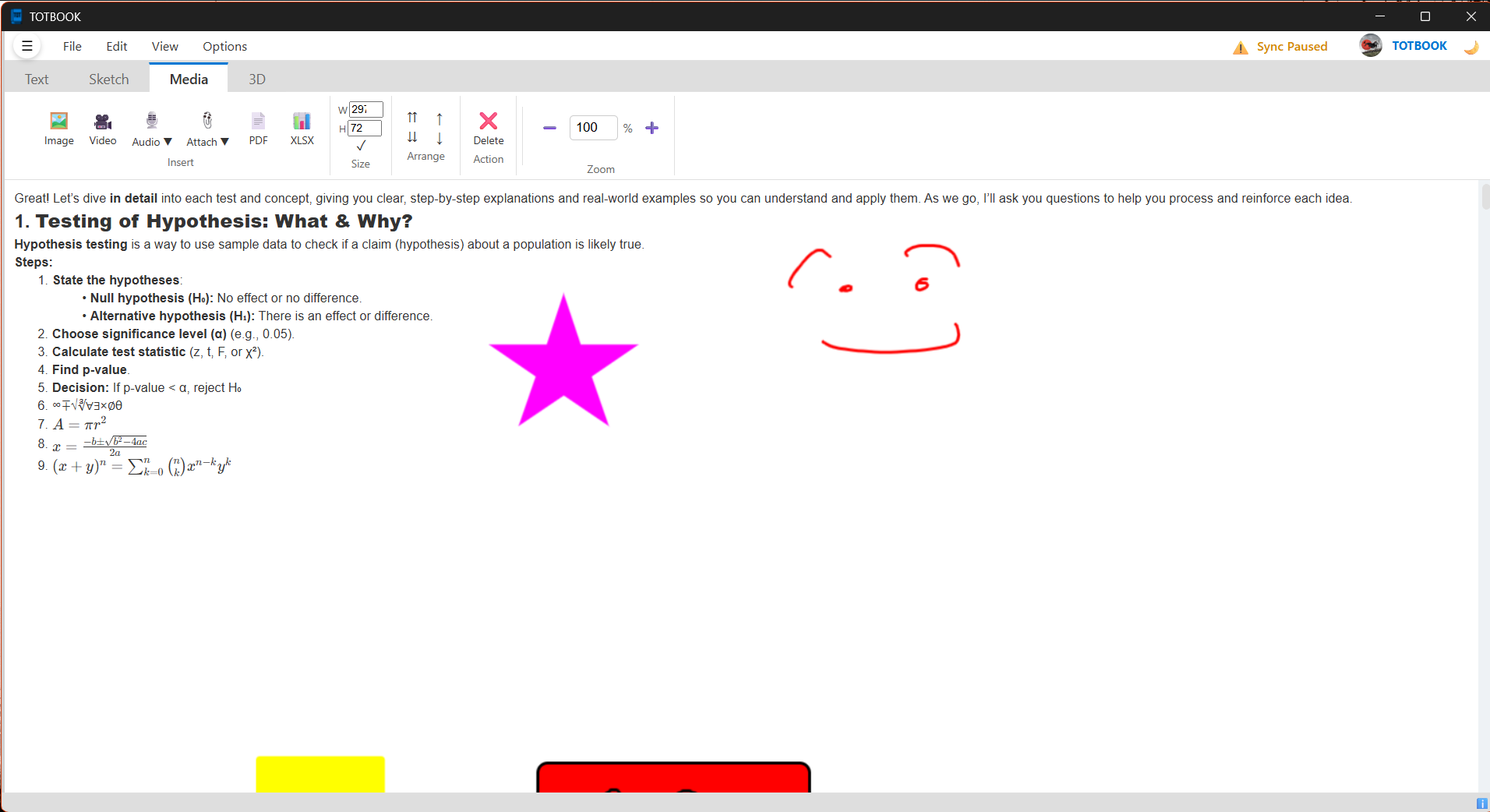 Figure 5: Fabric.js Vector Canvas
Ink Tools:
- Pencil Brush: Draws freehand anti-aliased vector paths.
- Pixel Eraser: A composite-operation brush (
destination-out) that draws opaque lines to erase parts of vector paths. - Stroke Eraser: Programmatically calculates bounding-box intersections. When a path drawn by this tool intersects with any canvas drawing, the intersected vector object is deleted, and the eraser path is removed from the canvas.
Magic Ink (Ink-to-Shape Recognition):
When drawing with "Magic Ink" enabled, paths are analyzed in shape_logic.js on pointer release:
- Line Check: If the distance between the starting and ending points exceeds 85% of the path's bounding-box diagonal, or if width/height are very small, it is converted into a straight vector line.
- Radius Variance (Circle/Ellipse Check): Calculates the center point of the path's bounding box and measures the radial distance to each resampled point on the path. If the Coefficient of Variation (CV) of these radii is less than 0.11, the path is converted into a vector Ellipse.
- Polygon Simplification (RDP): Paths that are not lines or circles are simplified using the
Ramer-Douglas-Peucker (RDP) algorithm (with a dynamic tolerance threshold, \(\epsilon =
\text{diagonal} \times 0.05\)).
- 3 points remaining \(\rightarrow\) Triangle.
- 4 points remaining \(\rightarrow\) Rectangle (if matching bounding box corners) or Diamond.
- 5 points remaining \(\rightarrow\) Pentagon.
- 6 points remaining \(\rightarrow\) Hexagon.
- 8–14 points remaining \(\rightarrow\) Star (if variance is high) or Circle (if variance is low).
- Right-Angle Snapping: If a triangle's corner angle is within \(\pm 15^\circ\) of \(90^\circ\), the geometry is snapped to create a right-angle triangle.
Infinite Canvas Expansion:
If a user draws or drags a shape near the bottom of the canvas (within 300px), the application dynamically
increases the #document-layer height, appends line breaks to the Quill text editor to grow the
scroll container, and resizes the Fabric canvas to match.
9. Interactive Media Viewers
Floating media blocks (.media-block) support multiple document formats, operating within dedicated,
sandboxed containers:
 Figure
7: SheetJS tabbed spreadsheet also audio waveform
Figure
7: SheetJS tabbed spreadsheet also audio waveform
 Figure
8: Three.js WebGL interactive 3D model viewer
Figure
8: Three.js WebGL interactive 3D model viewer
- Spreadsheets (SheetJS): Fetches and parses local
.xlsx/.xlsspreadsheets, constructing a sheet selector tab bar. Clicking a tab translates the worksheet data into styled HTML tables with dynamic scrollbars. - PDF Reader (PDF.js): Renders PDF documents sequentially onto canvases to optimize memory usage and keep the UI responsive.
- 3D Models (Three.js WebGL): Uses a pivot-group normalization routine to auto-scale models (STL, OBJ, GLTF, GLB, FBX, PLY) to a standard bounding scale (50 units) and align them on a grid. Users can rotate, zoom, and pan the model using WebGL rendering.
10. Desktop Integration & Storage System (Tauri & Rust)
The Rust backend handles heavy input/output tasks, desktop features, and system integrations:
Project Bundle Format (.totbook):
A .totbook project is a zipped archive containing:
project_file.totbook (ZIP)
├── manifest.json (document geometry, text delta, media indices, view settings)
└── media/
    ├── media_1718000000_0.png
    ├── voice_note.webm
    └── report.pdf
- Extraction: When opening a file, the Rust backend extracts the archive into the system temp
directory (
<temp_dir>/totbook_session). - Packaging: When saving, the backend updates
manifest.jsonin the temp folder, zips the contents, and writes the file to the target path.
Cloud Synchronization:
- Google OAuth PKCE: The backend spins up a local redirect server to capture the Google authentication callback, retrieves the authorization code, and requests the token securely to bypass browser CORS policies.
- Drive Sync: When a project is saved,
CloudManager.jsuses multipart uploads to transfer the updated.totbookzip bundle to the user's Google Drive folder.
System Integrations:
- Single Instance Locking: If a user double-clicks a
.totbookfile while the app is already open, the secondary process forwards the file path to the primary window via Tauri events and exits. - System Clipboard File Integration: Integrates with the system clipboard. Copying media
blocks runs a PowerShell command (
Set-Clipboard -LiteralPath) on Windows, converting local paths into file clipboard descriptors. This allows users to copy media assets from Totbook and paste them directly into other applications (like Explorer, Discord, or Telegram) as files.
System Architecture Constraints Summary
This hybrid solution maintains separation of concerns, letting high-performance filesystem and encryption algorithms execute natively in Rust, while utilizing web technologies for responsive document reflow layouts and interactive drawing canvases.